What is Hybrid Sleep and Differences with Basic Sleep Mode in Windows

HomeยปOperating SystemsยปWindowsยปWhat is Hybrid Sleep and Differences with Basic Sleep Mode in Windows

Sleep mode as a fast way to turn off the computer has been supported by Windows operating system for a while, which also known as Standby. Standby or Sleep is actually Windows implementation name of ACPI mode S3, while hibernate implements ACPI mode S4 (see differences between sleep and hibernate).

Unknowing to many, since Windows Vista, Windows also has a new feature named Hybrid Sleep, primarily aim and mostly useful for desktop PC and workstation computer. But what’s the differences between the two Sleep modes (the normal/basic Standby version versus the Hybrid Sleep mode)?

Sleep is a power saving or low power consumption state commonly known as Stand-by. In Sleep mode, computer system essentially ‘freezes’ all open documents and programs, then shuts down most components, but continue to power the main memory, thus the data in memory no need to be written and stored on hard disk. Sleep not only enables computer to save power (go into Standby very fast) almost immediately without losing existing working space, but Sleep also allows computer to quickly resume full-power operation when you want to start working again.

However, sleep mode does take up small amount of electricity power to maintain the computer memory state. Thus when power supply is cut or battery runs out of power, all data in memory is lost, and users will have to boot computer in fresh state again, in addition of running the risk losing unsaved files.

Beginning from Windows Vista, for Windows 10, Windows 8.1, Windows 8, Windows 7 and Windows Vista installed on a laptop or notebook computer, Windows enhances the Sleep mode so that the system will first goes into Standby to save power. Then, if the battery is lower till a critical state, or after a predefined period of time configurable in Power Options applet in Control Panel passes, the notebook system will will wake briefly from Standby and go into Hibernate mode so that the memory data is preserved and recoverable, and system no longer use any battery power.

Users can put computer into sleep by clicking on Power button on the Start Menu, or pressing a Sleep button, or simply leave your computer idle and inactivity for a period of time which defined in active power plan in Power Options. In mobile laptop, simply close the lid will activate Sleep mode.

So what is Hybrid Sleep? Hybrid Sleep is a low-power sleep state that can also protect your open programs and documents in current working state as system enter Sleep state while your computer sleeps. Hybrid sleep is defined mostly for desktop system as notebook PC already has safeguard measure mentioned above, which brings system into hibernation when battery power almost runs out, or if you’re not using battery on your notebook computer.

In Hybrid Sleep mode, system saves any open documents and programs to memory and to your hard disk, and then puts your computer into a low-power state as in normal Sleep/Standby state. An advantage of hybrid sleep is that if a power failure occurs, Windows can restore your work from your hard disk. If a power failure such as power outage occurs when your work is saved only to memory (as in Sleep mode), all work is lost. In Hyrid Sleep mode, if the computer suddenly loses power, users can still recover to last working state as when computer enters hybrid sleep mode because all data in memory is saved in hiberfil.sys hibernation file. In this case, the computer is acted exactly same with hibernation mode to resume computer activity, and yet still enjoy the benefit of fast return to full operation of Sleep mode.

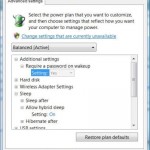
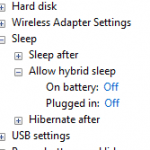
However, Hybrid Sleep mode takes longer or slower than basic Sleep mode due to the fact that it will need to save memory state into hibernation file as it was going into hibernate before actually going into sleep. You won’t see Hybrid Sleep button in Windows though. Once you enable Hybrid Sleep mode, whenever system enter Sleep mode, i.e. click on Sleep in Power option, Windows will always put the computer into Hybrid Sleep mode. If the Hybrid Sleep support is disabled or turned off, Sleep button will continue to be normal Sleep button.

About the Author:

LK is a technology writer for Tech Journey with background of system and network administrator. He has be documenting his experiences in digital and technology world for over 15 years.Connect with LK through Tech Journey on Facebook, Twitter or Google+.

  • Pingback: How to Enable and Turn On Hybrid Sleep in Vista » My Digital Life()

  • taltamir

    "In Sleep mode, computer system saves all open documents and programs"
    That is incorrect.

  • hsien

    thank u for this valuable information about hybrid sleep, since we have in lebanon major problems with electricity.

  • Mspirit

    Thank you very much…Really I am glade for this info. you can't imagine how long have I been looking to know the difference ๐Ÿ™‚

  • who the hell wrote this junk?

    it's entirely unreadable (english???) and factually incorrect

    pffft! what a waste of my time

  • pirateuser

    I really appreciate this information on Hybrid sleep. I was wondering why my PC used its HDD before going into standby, and why I had hybrid sleep as a power option. Now I know!
    THANKS SO MUCH =D

  • Spec

    thanks for the info ๐Ÿ™‚
    but then hybrid sleep is slow when its going to wake up already. so i tried something better.

    in execution priority sleep is always first than hibernate, so try setting hibernate and sleep for a certain time.
    ex: sleep 1hr
    hibernate 1min

    what will happen is, after 1hr it will execute sleep then after 1 min it will execute hibernate.

    you can try it your self, try setting sleep for 5 mins and hibernate for 1 min, and get a timer ๐Ÿ˜€

    ive tried it already and still using that method until now.

    btw im using windows 7
    hope this helps for having a new info ๐Ÿ˜€

  • PatHOgeN

    I agree with appalled reader. This person has either smoked themselves retarded, or took a crash course in an advanced English class. Wait!!!! I bet he used an internet translator to write that. I know cause my friend spoke french and i tried to always act like i knew how to as well by using altavistas Babel Fish translator. I do give him credit for inspired effort, but thats about it. It took off quite nicely but started to lose ground at an alarming rate. Imagine an Olympic high dive 50 feet up with someone standing on the end. Then they drop a rock into the pool and climb back down the stairs. Wait a rip.

  • Biohasm

    I find this article helpful. I found "appalled reader" and "PatHOgeN" replies as unnecessary and boorish.

  • Leo

    Bioshasm,

    You found it unnecessarily boorish because you probably are a native speaker of another language and really don't know English perfectly. You might even understand the article. This person completely butchers English, and that happens all over the internet. People are writing English more and more poorly and thinking they are correct.

    I happen to be looking for information and can only understand about 70% of this article.

    So, Biohasm, when your language starts getting butchered you might agree. Until then shut the F4#@ up.

  • Human Being

    Comments like these to a person who is trying to help only contributes to the belief by other cultures that America is full of arogant assholes. Help should be appreciated not complained about, especially when it if free and freely given.
    I am an American and I resent assholes like some of the people replying to this thread they way they did.
    I wonder if your dumb ass was hanging off a cliff and the only person around to save you was the person who wrote this post would you let yourself just drop because they can't speak perfect English?
    And of by the way, I wonder where you live. Do you live in the Northeast where car is pronounced cah? Do you live in the South where I grew up and wash is pronounced worsh? Do you live on the west coast where like is mandatory every fourth word?
    What I say to the writer of this article is thanks, it actualy helped me.
    What I say to the intolerant assholes who commented about English is move your dumbass to England and learn to speak the King's yourself because I'm sure you probably don't – if you wish that is.

  • It was obvious that the writer is not a native English speaker. So what? He was courteous and kind hearted enough to write an explanation, EVEN IN ANOTHER LANGUAGE, SO HE COULD HELP OTHERS, since that is a more-universally used language.

    Give the person credit for his efforts. To those who flippantly criticized the English: Examine your own conscience — is charity and love revealed, or is an exaggerated sense of self-importance and ideas attached to self revealed? Are you religious?
    Are you loving your neighbor as yourself? Or, have you lost sight of your professed ideals?

  • vahid

    Thank you.

    • Kelly Kyrik

      Vahid, I think that you're the author since you answered 'thank you' to one of the posts. I was going to ask 2 questions, but then I reread your last two paragraphs and realized you'd answered at least one of them. id just enable hybrid sleep and was worried

  • Tocon

    Thanks, just the information I was looking for.And ignore those fools that are picking holes in your writing.

  • A.E.

    Good info. I was trying to figure out whether traditional sleep or hybrid sleep would save my laptop the most power, and this answered the question nicely.

    To previous comments, regular sleep mode saves the computer's state to RAM, but not the hard drive. RAM is flushed on shutdown, which is why you can still lose data if the computer loses power while asleep. The article is correct, and I thought it was easily intelligible.

  • Name

    Can you learn English before attempting to write another article in said language?

    Thanks.

  • geez

    you are all sick :))

  • Nightwulfe

    This article describes exactly what I was looking for information on, in a concise form that was perfectly understandable in my opinion.

    To the naysayers, if you want to be so anal about English, you should not be using contractions in written form, capitalisation should be used, and 'cause' is not the same as 'because'. Also, if you claim to not be able to understand this article, you need to start questioning your troubleshooting and comprehension skills.

  • lol you trollz

    lol you guys leave his english alone . this is a good article and helps your fool asses activate hybrid sleep and know what it is .

    good article. i now understand the hybrid mode .

  • Franco

    You guys seriously need to drop off the racism, shit I totally see the way you fuckers are treating this writer.

    All he is trying to do is help us, I understand that English is not his first language, so what and frankly speaking I did not have any issues understanding his article.

    You guys should be ashamed of yourselves, or even better shot in the head for making such unacceptable comments.

    This is why many people around the world hate Americans because of all this negative, unnecessary and unacceptable way of thinking and treating people.

    No body is perfect. But if we all could help each other out, then the world would be a perfect place to live in.

  • Simon

    Thanks a lot for this article. I assumed this was the case but hadn't tested it properly.

    And to those who mock his English, anyone who knows a language fluently is able to understand what someone who is not fluent in that language is saying. I was able to read his article without any hesitation. You don't need to know a language perfectly in order to write it or speak it.

    And the fact you are saying such things on this article makes you look like fools. You obviously have nothing better to do with your time and just go around mocking small insignificant issues and frankly, who cares what you think. We all came to this article to hear about hybrid sleep of a computer, not your assessment on the author's writing.

    Especially to 'appalled reader' if it was such a waste of your time, why post a comment?

    And 'Loe' if you think you're so perfect at English, you obviously didn't prove it by swearing. That really does not shows appropriate English. That is lazy English which I believe is what you are moaning about.

  • Peter Heins

    Thank You for the information. You were spot on with the explanation. Leave the dum motherf#rs who can not understand technology because they have language issues. Bundle those assholes to mental enhancement trainings to booster their lives. Keep writing these useful articles.

  • Planet_Horizon

    "… Sleep not enough enables computer to save power (go into Standby very fast) almost immediately without losing existing working space, but Sleep also allows computer to quickly resume full-power operation when you want to start working again"

    enough should be ONLY

  • Kelly Kyrik

    Sorry for that first post; I was first drafting and dealing with a computer that has a mind of it's own. Here is the entire post. Hi Vahid, I'm assuming you're the author of the article since you said 'thank you' to one of the posts. I was just dealing with the power settings, etc, on my laptop and had a question that you actually answered in your last two paragraphs, namely: how is hybrid sleep different from regular sleep and also from hibernation. You also said that even tho the start icon only shows sleep or shutdown, it will actually go to hybrid sleep. I'm repeating this just to ask: did I get it right? And also, a real question…I run Windows 7 (which I very much hate.) Will it do the same thing: go to hybrid sleep soon after it's put into sleep mode? I would also like to say to everyone else…the only reason I didn't understand a lot of the article is because of my own technical ignorance, not because of anything the author did wrong. And if it's true that English isn't the author's first language, I would like to see all of you, um, naysayers, write an article that addresses this topic in a language that you not fluent in, say, German or Lebanese. My guess is that *none* of you are not fluent in any other language besides flaming, middle school English. There are mean, nasty people with too much time on their collective hands on this site. There are also well mannered, literate, likable and Knowledgeable people here. Thx to all of you and to author of this article.

  • maw

    My question is does hybrid sleep use S1 or S3?

  • Red October

    910 times the people who complain about butchered English are American, so they can be ignored ?
    native english speakers (real English that is), tend to understand and enjoy a wider use of the language and appreciate its evolution. That is what makes it a wonderful language. Enjoy it?
    this hybrid sleep is not working out so well for me, its maybe a second or two faster than a full reboot.
    I see we also have a new sleep state similar to cell phones etc. Its a real shame about the requirements (soldered ram etc).
    although with a good motherboard the power usage can be as low as 1w while remaining active enough to receive notifications and not require a full sleep state.
    I use a UPS and Asus x-79 and was pretty amazed at the low power usage, 100w average for normal desktop use, even with a gtx970 powering the graphics and LCD monitor plugged into the ups.

  • In other words it’s a stupid waste of energy just like sleep.

    Hibernate, or don’t bother. As far as I am concerned anyway.

  • Oranjwoman

    This was well written. I often have to search other articles or websites to understand terminology that is used when understanding a basic concept.

Pin It on Pinterest

Share This

Share This

Share this post with your friends!