After upgrading to Chromium version 144, many Chromium based browser (e.g. Google Chrome version 144, Brave version version 1.86.139, Helium 0.8 etc.) users noticed that the tab scrolling feature of tabstrip is not working. In fact, all the tabs are squeezed into tiny pinned width on the horizontal bar which makes the browser looks very messy, very hard to manage huge amount of tabs, almost impossible to locate and open specific tab, and especially those the overflowed out at the end of tabstrip are essentially hidden from view.
According to staffs of Google , this is in fact the intended change made to Google Chrome browser. Various flags that are related to tab scrolling have been removed on Chromium version 144, including #scrollable-tabstrip flag that enables the tab scrolling feature. As the changes are done at upstream Chromium code, it also affects various Chromium based browsers, including Google Chrome, Brave and Helium.
If you can’t live without tabs scrolling, here’s a few workarounds that are able to fix or mitigate the issue.
1. Use Vertical Tabs
Due to the design of vertical tabs, scrolling is always integrated by default. In fact, Chromium will have Vertical Tabstrip which integrated tabs scrolling by default beginning from version 145. Unfortunately, Google Chrome version 145 on Stable channel is still probably a few weeks away.
However, Brave, Microsoft Edge, Vivaldi and Google Chrome on Beta, Dev or Canary channels already have vertical tabs feature enabled, so you can switch to them temporarily.
2. Move Overflowed Tabs to Another Window
Another workaround is by moving tabs to another new browser window, which can be done by drag and drop. In this case, the number of tabs will reduce in original window, potentially fix the tabs overflowed out of tabstrip issue.
3. Downgrade Google Chrome / Brave Browser
The most effective, but not recommended method (due to potential missing out critical security updates or compatibility updates), is by downgrading the web browser to the last version which supports tabs scrolling. Here’s how you can downgrade Google Chrome and Brave web browser.
Downgrade Google Chrome
1. Close all Google Chrome windows, and perform the backup of your profiles (use chrome://version to find out the path to your profiles.)
2. Uninstall Google Chrome.
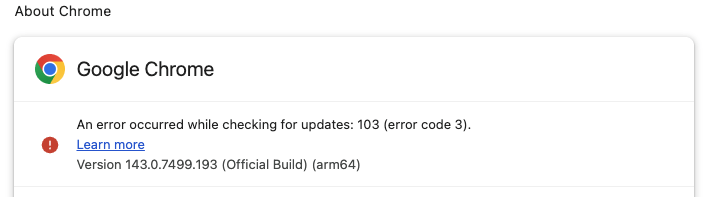
3. Unfortunately, Google does not provide download links for older versions of Chrome. So, download older version of Chrome for the OS from third party sites such as UpToDown (Windows here or macOS here). The last version of Chrome which still has scrollable tabstrip option is 143.0.7499.193.
4. Install the older version of Google Chrome.
5. Disable Google Chrome automatic updates.
On Windows:
Type Win + R, and type in services.msc, and press Enter to open the Services Manager.
Find Google Update Service (gupdate) and Google Update Service (gupdatem) in the list.
Double-click each service, go to the General tab, and change the Startup type to Disabled.
Stop the services if applicable (make sure the status is “Stopped”).
Change the permissions on the “GoogleSoftwareUpdate” folder so that there’s no owner and no read/write/execute permissions with the following commands:
cd /Library/Google/
sudo chown nobody:nogroup GoogleSoftwareUpdate
sudo chmod 000 GoogleSoftwareUpdate
cd ~/Library/Google/
sudo chown nobody:nogroup GoogleSoftwareUpdate
sudo chmod 000 GoogleSoftwareUpdate
On macOS, while Google Chrome will still attempt to update the web browser, the attempt will fail with error.
6. Launch the newly installed previous version of Chrome. Enter: chrome://flags in address bar and search for Tab Scrolling. Enable it to bring back the tabs scrolling feature.
Downgrade Brave
1. Close all Brave windows, and perform the backup of your profiles (use brave://version to find out the path to your profiles.)
2. Uninstall Brave.
3. Download the older version of Brave from Github (the last version of Brave that utilizes Chromium version 143 which still have tabstrip scrolling support is Brave version v1.85.120.
4. Install the older version of Brave.
5. Disable Brave automatic updates by adding the following DNS entries into hosts file of the operating system:
6. Launch the newly installed previous version of Brave. Enter: brave://flags in address bar and search for Tab Scrolling. Enable it to bring back the tabs scrolling feature.
LK is a technology writer for Tech Journey with background of system and network administrator. He has be documenting his experiences in digital and technology world for over 15 years.
Connect with LK through Tech Journey on Facebook, Twitter or Google+.